The Minimum Delay Mechanism of setTimeout
Introduction
In JavaScript, setTimeout is one of the most commonly used timer APIs. However, many developers may not know that when we set a theoretical “0 millisecond” delay, it is not actually 0ms. In some scenarios, the actual execution time will never be less than 4ms. Behind this seemingly strange limitation lie deep technical reasons and historical origins.
The Evolution of the Minimum Delay Value
Historical Changes
- 1995: JavaScript was first introduced in Netscape Navigator.
- 2003: IE implemented a minimum delay of 15.625ms.
- 2009: Firefox adopted a 10ms limit.
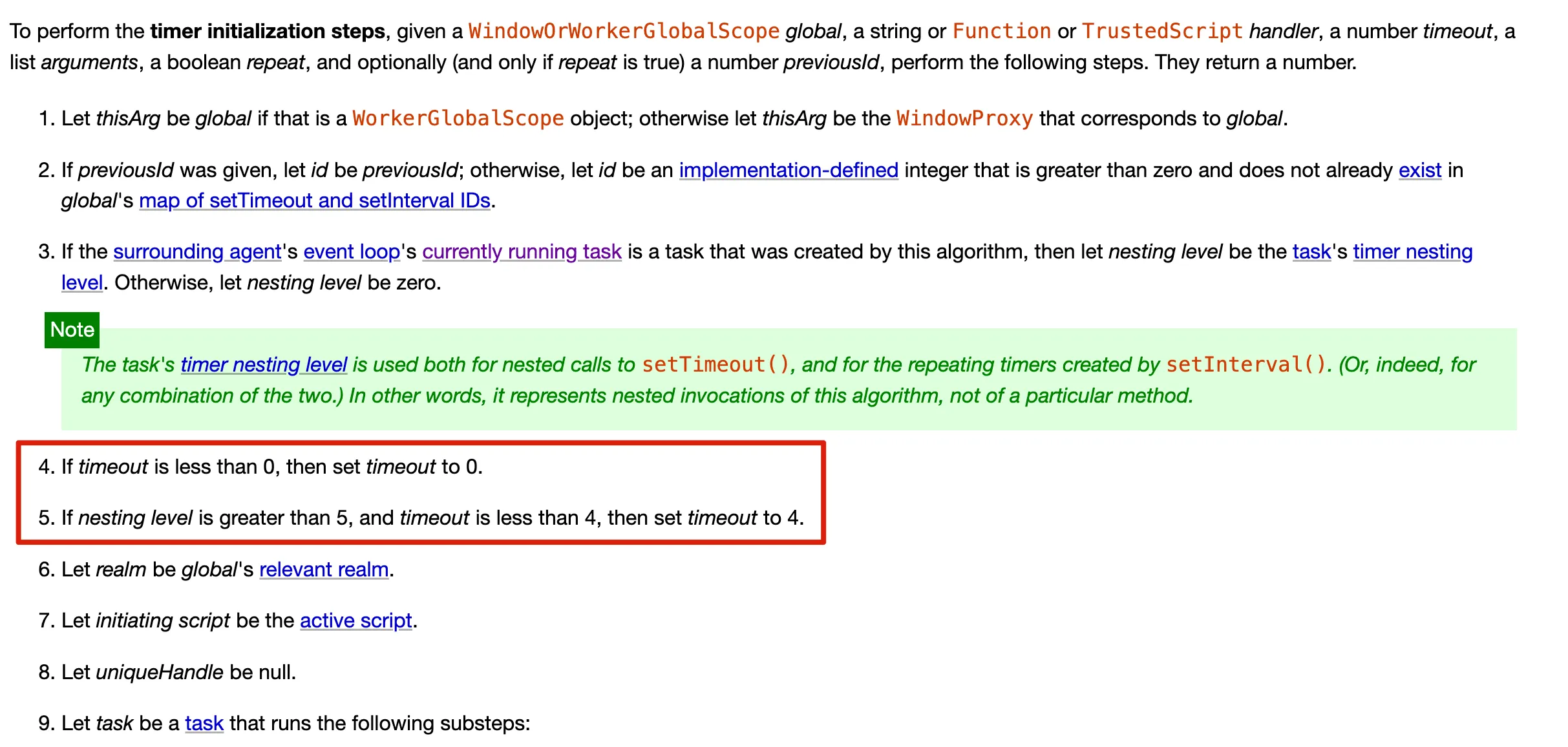
- 2010: The HTML5 specification standardized the minimum delay to 4ms for scenarios where the nesting level is greater than or equal to 5, and 0ms for levels less than 5.
Specification Basis
HTML Specification
According to the HTML Living Standard:
- If the set
timeoutis less than 0, it is set to 0. - If the nesting level exceeds 5, and the
timeoutis less than 4ms, thetimeoutis set to 4ms.
Chrome Source Code Analysis
In the Chromium source code, we can see the relevant implementation:
static const int kMaxTimerNestingLevel = 5;
static const double kMinimumInterval = 0.004; // 4ms
Technical Principle Analysis
1. Event Loop and Timers
JavaScript’s event loop mechanism is key to understanding the behavior of setTimeout. A timer is not a true “sleep,” but rather places a callback function into a queue awaiting execution. The callback function is executed only after the timing conditions are met.
2. Measuring the Minimum Delay
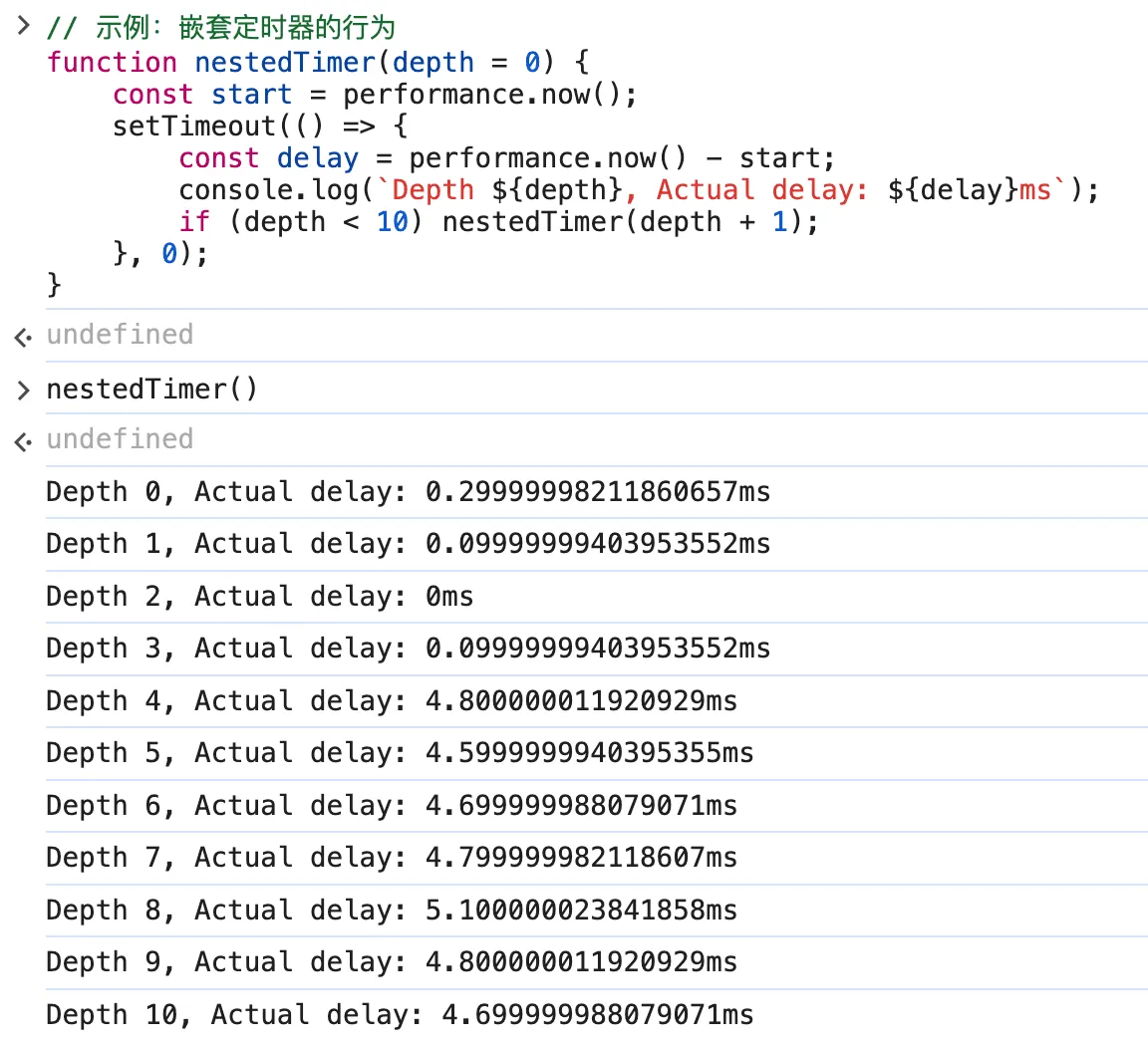
Below is an example of measuring the actual delay time of setTimeout:
// Example: Behavior of nested timers
function nestedTimer(depth = 0) {
    const start = performance.now();
    setTimeout(() => {
        const delay = performance.now() - start;
        console.log(`Depth ${depth}, Actual delay: ${delay}ms`);
        if (depth < 10) nestedTimer(depth + 1);
    }, 0);
}
Result Analysis
When the nesting level is less than 5, the theoretical delay time is 0ms; when the nesting level is greater than or equal to 5, the theoretical delay time is 4ms (this differs slightly from the HTML specification). However, the actual execution delay is subject to the event loop mechanism. The setTimeout callback needs to wait for:
- The current synchronous code to finish executing.
- The state of the microtask queue.
- The timer to expire.
- Waiting for the next macrotask execution opportunity.
- Code execution overhead.
Therefore, the actual delay will float upwards from the set value. But the lower bound of the timeout value is constrained by the nesting level.
Performance Impact and Optimization
1. CPU and Battery Impact
Overly frequent timer calls can lead to:
- Increased CPU usage
- Increased device heat
- Reduced battery life
2. Alternatives
For scenarios requiring high-precision timing, it is recommended to use:
requestAnimationFrame
requestAnimationFrame(() => {
	// Used for precise control of animations
});- Web Workers
// worker.js
setInterval(() => {
	postMessage('tick');
}, 0);
performance.now()
const start = performance.now(); // Used for precise timingConclusion
The 4ms minimum delay of setTimeout is a well-thought-out design decision that balances development convenience, performance overhead, and browser compatibility. Understanding this mechanism helps us write better asynchronous code.