Vue3 Compiler Macros: Usage and Principles
Vue3 compiler macros are a special type of syntactic sugar used to simplify the declaration of component options. They can be used within <script setup> and are processed during the compilation phase. Compiler macros provide features such as type inference, runtime elimination, and optimization of the development experience.
I. What are Compiler Macros?
Vue3 compiler macros are special directives or functions processed during the code compilation phase. Vue3’s compiler macros are primarily designed for the <script setup> syntax. Compiler macros can be used directly without being imported, and they are compiled away along with the processing of <script setup>.
II. What are Compiler Macros Used For?
Compiler macros provide a more concise way to write and maintain existing configurations. In Vue3, compiler macros mainly serve the following purposes:
- Type Inference and Checking: Macros can provide type safety, helping developers avoid type errors when writing code.
- Runtime Elimination: In Vue3’s
<script setup>, the macros introduced are processed during the compilation phase, and the final generated code may not contain these macros. This means macros can provide additional functionality without increasing runtime overhead. - Code Reuse and Maintenance: By defining macros, the same logic can be reused across different components. This helps maintain code consistency and reduces the writing of boilerplate code.
- Simplified Configuration: Certain macros can be used to simplify the configuration of Vue components, making the configuration more concise and clear.
- Optimized Development Experience: Macros can reduce boilerplate files and provide a more concise syntax, thereby improving development efficiency and experience.
- Advanced Features: Some macros may provide advanced features, such as automatic component registration, automatic dependency import, etc.
III. Common Compiler Macros
Vue 3 introduced several Compile-time Macros to improve performance and development experience. These macros are transformed into efficient code during compilation. Here are the main compiler macros:
defineProps
- Used to declare component props
- Example:
const props = defineProps(['title', 'likes'])
defineEmits
- Used to declare events that the component may trigger
- Example:
const emit = defineEmits(['change', 'delete'])
defineExpose
- Used to explicitly specify which properties and methods can be accessed by the parent component
- Example:
defineExpose({ method1, property1 })
withDefaults
- Used to provide default values for props defined by
defineProps - Example:
const props = withDefaults(defineProps<Props>(), { message: 'hello' })
defineOptions
- Used to define component options, such as
name,inheritAttrs, etc. - Example:
defineOptions({ name: 'MyComponent', inheritAttrs: false })
defineSlots
- Used to define types for slots when using TypeScript
- Example:
const slots = defineSlots<{ default: (props: { item: string }) => any }>()
defineModel
- Used to simplify the use of
v-modelin version 3.4+ - Example:
const model = defineModel<string>({ default: '' })
defineAsyncComponent
- Although not a compiler macro, it is a runtime helper function used to define asynchronous components
- Example:
const AsyncComp = defineAsyncComponent(() => import('./components/AsyncComponent.vue'))
These compiler macros are primarily used in <script setup>, providing a more concise syntax and better type inference. Using these macros can reduce boilerplate code and improve code readability and maintainability.
IV. Implementation Principles of Compiler Macros
The essence of a compiler macro is a transformation function executed during the compilation phase. Its working principle is as follows:
- Identification: The compiler identifies specific macro calls (e.g.,
defineProps()). - Analysis: It analyzes the arguments and context of the macro call.
- Transformation: It transforms the macro call into appropriate runtime code or component options.
- Type Generation: (In a TypeScript environment) It generates corresponding type declarations.
- Code Generation: It generates the final JavaScript code, typically removing the macro call itself.
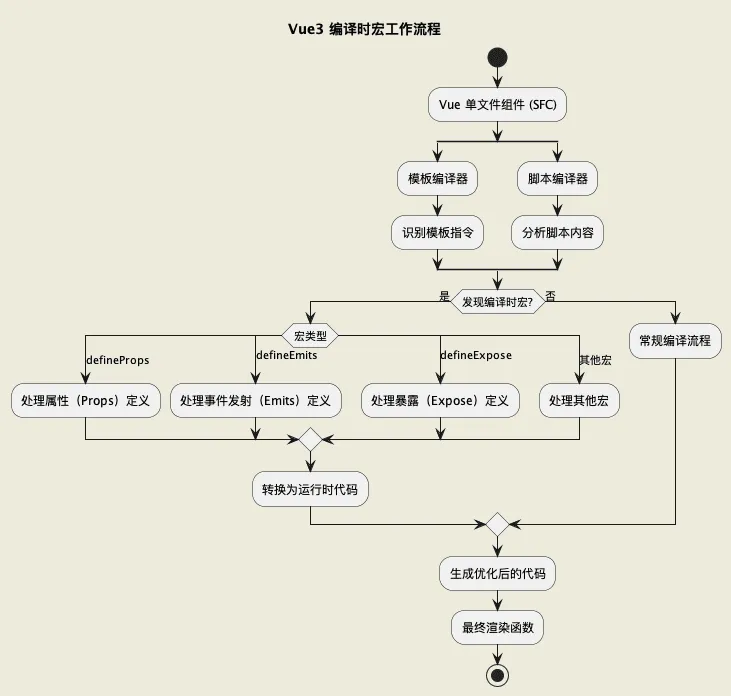
1. Implementing a Compiler Macro Feature using defineProps as an Example
Below is a simple implementation of a babel plugin. It can transform the Vue3 compiler macro defineProps into a Vue props object. From this example, you can better understand the essence of compiler macro syntactic sugar.
const { declare } = require('@babel/helper-plugin-utils');
const { types: t } = require('@babel/core');

module.exports = declare(api => {
  api.assertVersion(7); // Ensure Babel version compatibility

  return {
    name: "babel-plugin-transform-define-props",
    visitor: {
      CallExpression(path) {
        // Check if it is a defineProps function call
        if (path.node.callee.name === 'defineProps') {
          const arg = path.node.arguments[0];

          if (t.isObjectExpression(arg)) {
            // Handle object syntax: defineProps({ prop: String })
            const properties = arg.properties.map(prop => {
              // Transform each property into the form { prop: { type: PropType } }
              return t.objectProperty(
                prop.key,
                t.objectExpression([
                  t.objectProperty(t.identifier('type'), prop.value)
                ])
              );
            });

            const propsObject = t.objectExpression(properties);

            // Replace the defineProps call with an __props__ assignment
            path.replaceWith(
              t.variableDeclaration('const', [
                t.variableDeclarator(
                  t.identifier('__props__'),
                  propsObject
                )
              ])
            );
          } else if (t.isArrayExpression(arg)) {
            // Handle array syntax: defineProps(['prop1', 'prop2'])
            const properties = arg.elements.map(element => {
              // Transform each element into the form { prop: null }
              return t.objectProperty(element, t.identifier('null'));
            });

            const propsObject = t.objectExpression(properties);

            // Replace the defineProps call with an __props__ assignment
            path.replaceWith(
              t.variableDeclaration('const', [
                t.variableDeclarator(
                  t.identifier('__props__'),
                  propsObject
                )
              ])
            );
          }
        }
      }
    }
  };
});
2. Transformation Effect
// Before transformation: Object syntax
const props1 = defineProps({
  name: String,
  age: Number,
  isActive: Boolean
});

// After transformation: Object syntax transformation result
const __props__ = {
  name: { type: String },
  age: { type: Number },
  isActive: { type: Boolean }
};

// Before transformation: Array syntax
const props2 = defineProps(['title', 'content']);

// After transformation: Array syntax transformation result
const __props__ = {
  title: null,
  content: null
};
During compilation, it identifies specific code patterns and transforms them into equivalent but potentially more complex or optimized code. In the actual implementation of Vue, this process would be much more complex, including handling type inference, default values, validation, and various other aspects.
Conclusion
This article introduced Vue3 compiler macros. Compiler macros are a powerful feature of Vue3; they provide a more concise syntax and better type inference, making component writing more efficient and enjoyable.